
Tarot Netivot Star of the Week Reading Sunday December 21 - Shabbat December 27, 2025

By Natural Mystic Guide in Star of the Week
· 187 views
Feedback -- Questions and comments are welcome.
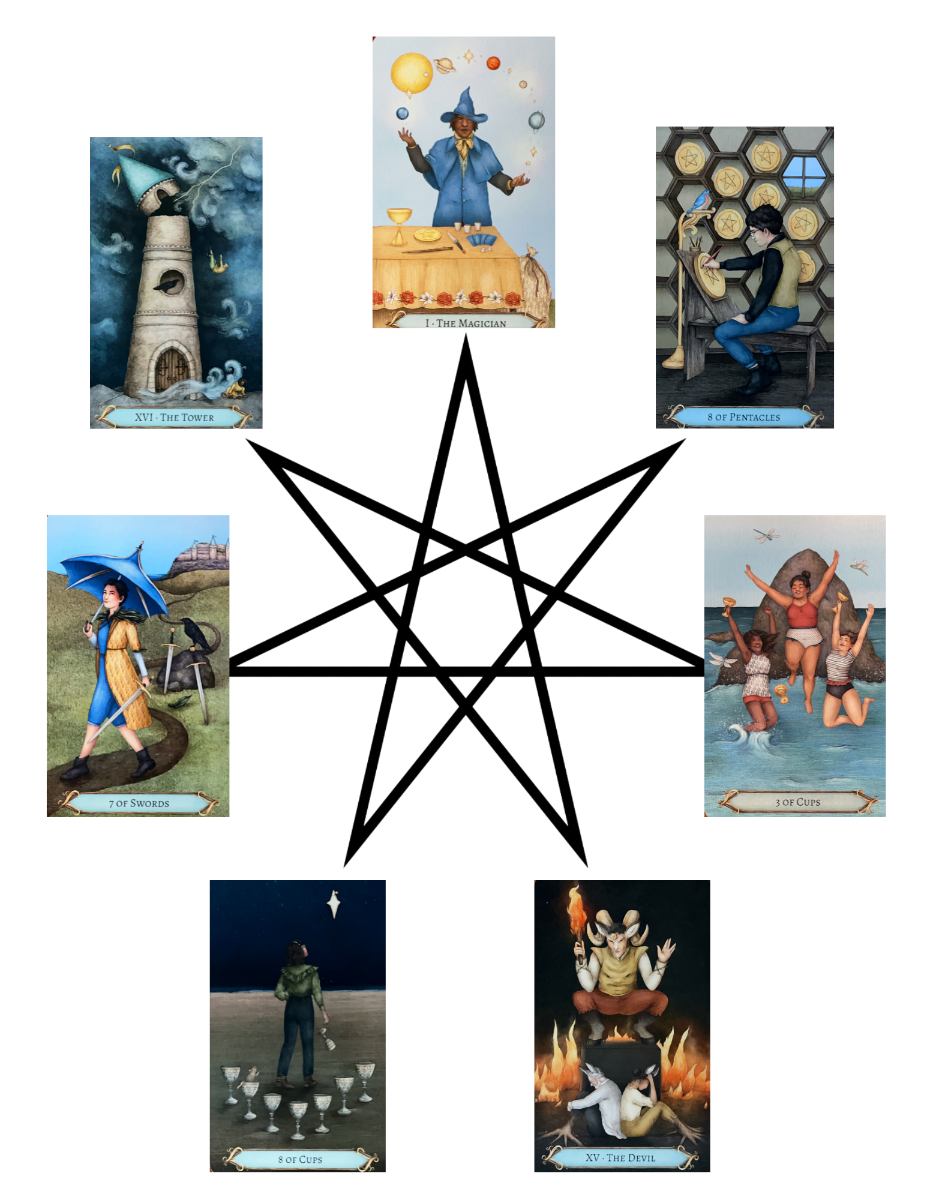
This reading gives us insight into energies that we can focus on during specific days of the upcoming week as well as throughout the entire week as a whole
This week's reading will use the Good Fortune Tarot by Barbara Moore illustrated by Jessica Roux.
Here are focal points for our meditation:
Sunday: How Can I Express Generosity: I Charsheta 'Shamans' Organize dream journals.
Monday. How Can I Set the Emotional Tone for my Week? XV 'Babylon' Research some new recipes for celebration.
Tuesday: What Do I Want to Manifest? XVI 'Initiation' Pray about continuing Active Dreaming training.
Wednesday: What Wisdom is Coming to Me? Three of Cups Chaveruta 'Friendship' Do a reading from El Goliath deck.
Thursday: What Do I Want to Develop? Seven of Swords 'Innovation' Continue working on Mahjong hands that I am learning.
Friday: How Can I Connect with Romance, Friends and Nature? Eight of Pentacles 'Mastery' Calendar for this lunar year.
Shabbat: How Can I Rest? Eight of Cups Shmita 'Retreat' Massage and hot bath.
Recommended Comments